FAQ
1. When I open profile viewer no ECID is displayed. You can see a message "An error occurred while executing the getIdentity command"
Some pages have higher level of security. You can see e.g. CORS error. This plugin can help to remove existing content security policy rules from any webpage (from the response header).
Be aware that if this plugin is on, you won't be able to load Adobe Target environment. Make sure it is disabled before working with Target.
2. When to use Login and when Registration Event
Registration | Login |
|---|---|
Creates new profile. If the profile with the same email already exists it will merge those profiles | Profile needs to exists in AEP e.g. uploaded before the demo using eg json file. |
It is send as Profile Ingestion using dcs inlet | It is send as Experience Event |
It is a better solution if profile merge temporarily doesn't work in AEP | Fails if there is a temporarily bug in AEP |
It does not require for the profile to be present in AEP | It required the profile to exist before in AEP |
It required updating at least 3 Data Elements: Profile - Email, Profile - First Name, Profile - Last Name | It required updating only one Data Element: Profile - Email |
It requires the " Registration" rule condition update - which button will trigger the Login Event | It requires the "Login" rule condition update - which button will trigger the Login Event |
It can also show additional data from profile if the profile already exists in AEP e.g. some segment details, additional profile info that was not provided in registration form | If the profile merge is sucessfull the result will allow you to show profile details including new profile data, segments and ingested experience events from external sources or previous sessions |
3. How do I get the CSS selectors for e.g. the Email Field (for Login or Registration)


4. How do I put in a default value and not worry about the CSS selector
5. Profile Viewer: How to customize the displayed attributes / fields


6. How do I send my first and last name?
- If you are using "Login" event you only need the email address - typically the stitching is via email address to previously ingested data via CSV, and it simply picks up that first+last name that you put in the CSV.
- If you are using "Registration" rule, or want to update the Login event you can override/add First Name, Last Name by updating the Launch Data Elements for 'Profile - First Name' and 'Profile - Last Name'. Either hardcode the value with default value or use css selectors to get the first name/ last name from form fields on the page (
7. Images in experience events are not showing. How to fix that?
8. How can I check what if I set up the data elements right

9. Can I use Offer Decisioning with an External Web Page?
Yes you can


12. Can I use Target with an External Web Page
Yes, you can include Target on an external website project.
13. Can I add a chatbot to the external web page?
Yes, you can include the chatbot on an external website project.
14. How do I update the Profile Viewer extension to the newest version in my Data Collection tag?
- Open your Data Collection Tag in AEP.
- Go to the Extensions tab.
- Locate Demo System Profile Viewer. Click on it and then click on Upgrade to vX.X.X (where X.X.X will be the current latest version).
- You will be asked if you are sure. Click on Upgrade in that dialog.
- Navigate to Publishing Flow tab.
- In the Development column click on the three dots in the Main tile, and choose Edit from the context menu.
- Find Extension: Demo System Profile Viewer on the list. Choose it.
- In the dropdown that will appear with Revision X choose the newest Revision and then click on the Select Revision button.
- Click on Save & Build to Development and wait for the build to finish.
Below are instructions in the form of a video:
15. Troubleshooting Guide: Invalid Token Error in Profile Viewer
❗ Issue
When accessing Profile Viewer, the following error message may appear:
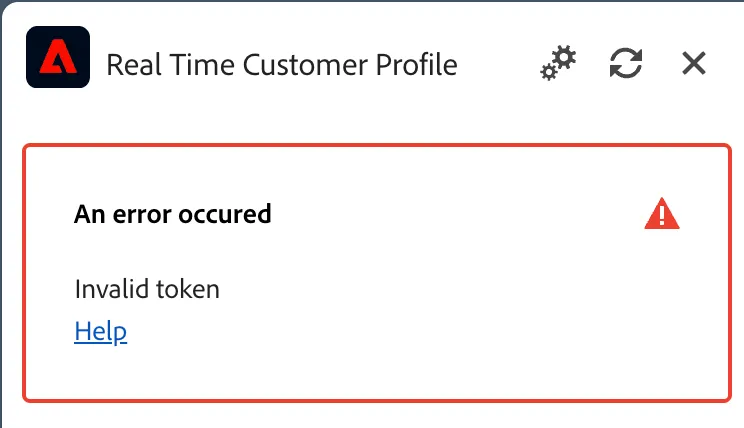
This usually means the authentication token linked to your project has expired or is no longer valid.
✅ Solution
- Generate a new project in your environment. Once the new project is created, the error will be resolved automatically.
📩 Need Help
If the issue persists, please reach out to the DSN team on the Slack channel #demo-system-next for assistance.