Bulk data-file update
Goal
Ingest large retail industry event data into Experience Platform datasets.
Pre-requisites
- Schema setup using dsn.adobe.com/quick-setup
- Data from Tools > Data -> BULK DATA is compatible in "Adobe Demo System Shared" Org. ( demosystem4 ) (In order to ingest data in other org, refer to the Updating data for other org section.)
Data-files
- Enabling datasets for "Profile" adds cost for identity services. Unless you need to show the profiles dashboard/events/audience/profile-scores; it's advisable to keep datasets disabled for "Profile".
- You may choose to leverage existing datasets (which is enabled for "Profile" by default) OR choose to create new datasets. Refer the "BASE SCHEMA" columns in below table.
- You may choose to use the output generated for AJO.
- You must create new datasets to ingest "AJO" related data files.
- To ingest "profiles.csv", use "Workflow" UI (Map CSV to XDM) feature. Choose the attributes to include. Profile attributes, other than identities; such as, email, crmId, loyaltyId etc. are open to be customized for your use case. You may use excel / numbers expression to randomly populate data for existing column or new columns.
FILE NAME | BASE SCHEMA |
|---|---|
WEBSITE-EE-*.json | Demo System - Event Schema for Website (Global v1.1) |
MOBILE-EE-*.json | Demo System - Event Schema for Mobile App (Global v1.1) |
CALL-CENTER-EE-*.json | Demo System - Event Schema for Call Center (Global v1.1) |
CHATBOT-EE-*.json | Demo System - Event Schema for Stackchat Chatbot (Global v1.1) |
OFFLINE-EE-*.json | Demo System - Event Schema for POS (Global v1.1) |
AJO-TRACKING-EVENTS-*.json | AJO Email Tracking Experience Event Schema |
AJO-FEEDBACK-EVENTS-*.json | AJO Message Feedback Event Schema |
AJO-STEP-EVENTS-*.json | Journey Step Event schema for Journey Orchestration |
AJO-ENTITY-RECORDS-*.json | AJO Entity Record Schema |
profiles.csv | Demo System - Profile Schema for CRM (Global v1.1) |
IDENTITY MAPPING
To unify the events from multiple datasets, you need to choose identiy key, which allows to stitch data.
- For "AJO" related datasets choose IdentityMap & Select CRM ID as the identity key.
- For other datasets like web, mobile, chatbot, call-center & offline; choose: <_tenantId>.identification.core.crmId
Entity relationship
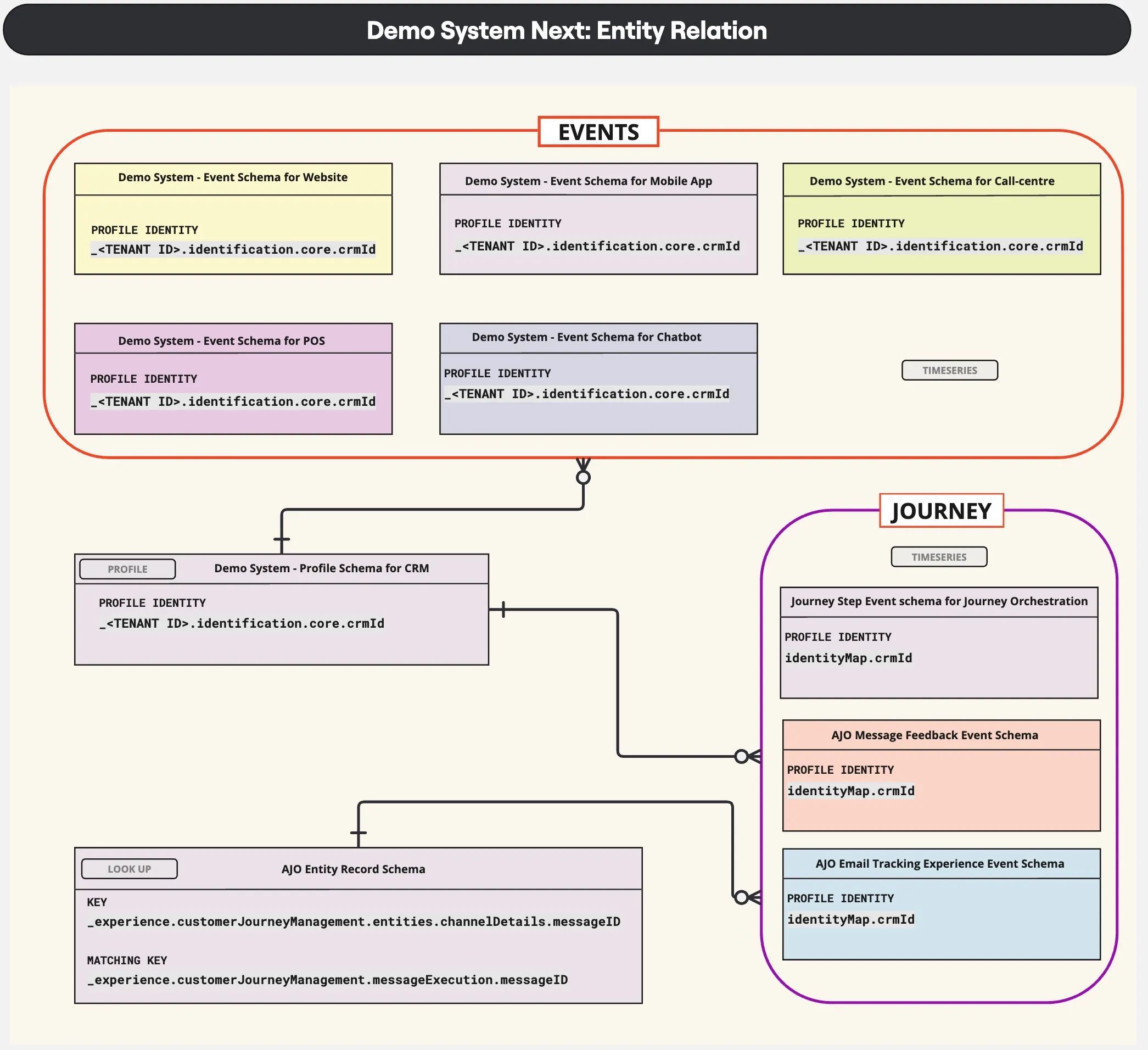
Data ingestion
Referring above mentioned schemas, you may choose to use existing datasets or you may create new dataset. Enabling datasets for Profile, is optional for data ingestion. If you’re planning to search for the uploaded Profiles or show customer experience events in Profile details tab; then, dataset should be enabled for Profile.
Open the dataset and drag-drop the JSON files to start ingestion process. While uploading files, check the file names, it should match as mentioned above. You can upload multiple files for a dataset.
Updating data for other org
These pre-generated event data have Adobe Demo System Shared Org tenant-id, _demosystem4, referred in XDM.
So, to ingest these output files in other Org, you would need to replace the existing tenant-id with the target Org.
Mac OS:
- Open "Terminal" app
- Navigate to the data extracted directory path: cd folder-path-where-output-file-availabe Example: cd Documents/2024-25/XEGen-IS-R/luma-events-latest/EVENTS
- This directory / folder should containt only the .json files.
- Execute the following command to replace: find . -type f -name "*.json" -exec sed -i '' 's/\"_demosystem4\"/\"_NEW_TENANT\"/g' {} + Example: find . -type f -name "*.json" -exec sed -i '' 's/\"_demosystem4\"/\"_demoamericas26\"/g' {} +
Windows:
- Open command prompt or power-shell
- Navigate to the data extracted directory path: cd folder-path-where-output-file-availabe Example: cd Documents\2024-25\XEGen-IS-R\luma-events-latest\EVENTS
- This directory / folder should containt only the .json files.
- Execute the following command to replace: for /r %f in (*.json) do powershell -Command "(Get-Content -Path '%f') -replace '\"_demosystem4\"', '\"_demoamericas26\"' | Set-Content -Path '%f'"