Contact form
3 min
A contact form component is a user interface element designed to facilitate communication between users and an organization or individual. Your version of the component includes three essential fields.
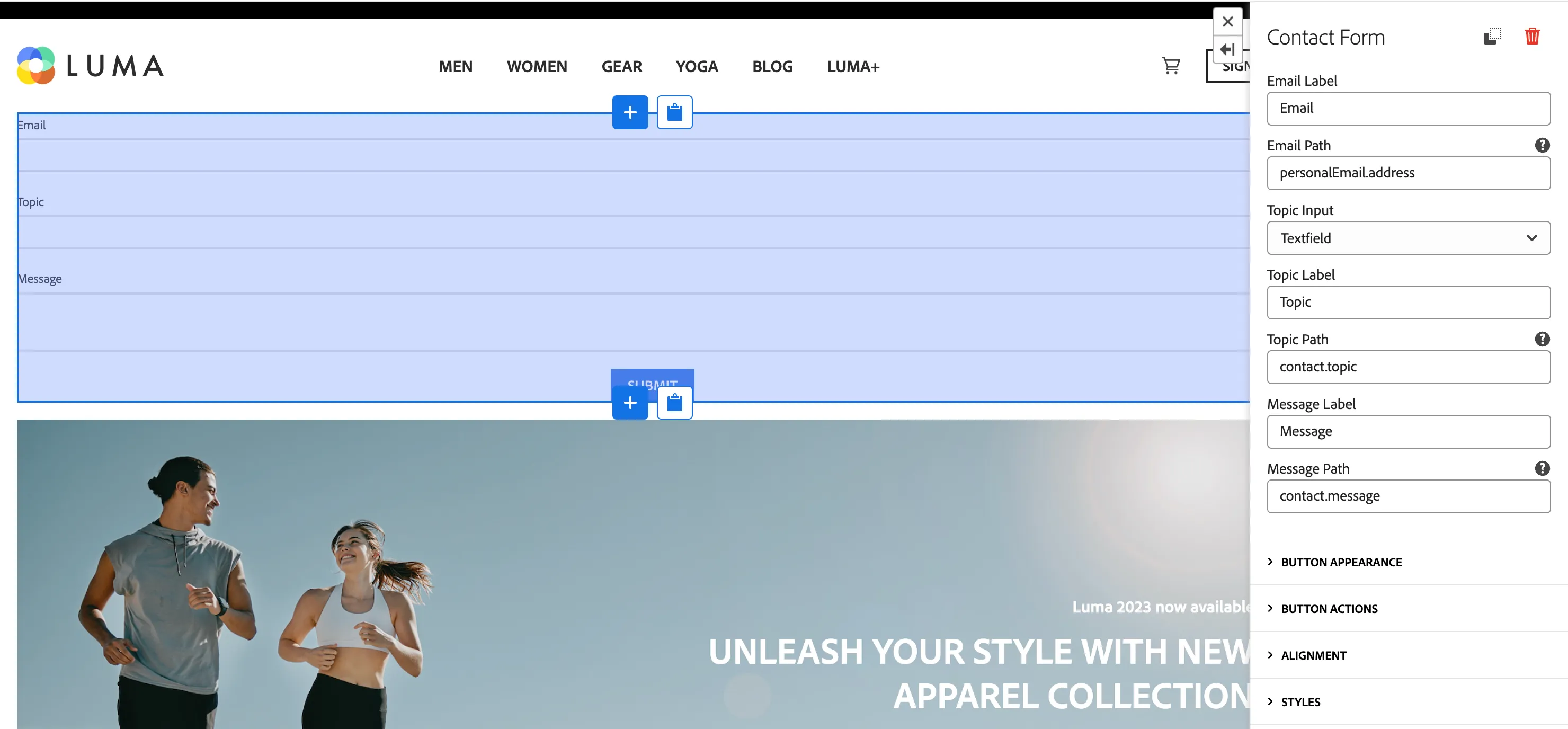
Properties
Generic
- Email Label - Text that will be displayed over the email field
- Email Path - Path under which field value will be stored in request or dataLayer. Must match AEP schema to enable pre-filling from profile. Eg. person.name.firstName. If empty, name is used. Either name or path must be set to store field in dataLayer or request payload.
- Topic Input - form of the topic field: textfield, picker, hidden
- Topic Label - Text that will be displayed over the topic field
- Topic Path - Path under which topic field value will be stored in request or dataLayer. Must match AEP schema to enable pre-filling from profile. Eg. person.name.firstName. If empty, name is used. Either name or path must be set to store field in dataLayer or request payload.
- Message Label - Text that will be displayed over the message field
- Message Path - Path under which message field value will be stored in request or dataLayer. Must match AEP schema to enable pre-filling from profile. Eg. person.name.firstName. If empty, name is used. Either name or path must be set to store field in dataLayer or request payload.
Button appearance
- Label - text to be displayed on the button
- Variant - visual variant
Button actions
- Link to - screen to navigate to on click
- Open as product page (optional) - if you select Product template page in a Link to, select which product should be displayed on the product site.
- Event Type - name (type) of event to generate on click. Used to trigger Data Collection Tag Property Rules. Leave empty for no event.
- Webhook URL - URL to which a request should be sent on click. Leave empty for no request.
- Form Id - used to filter properties to include in webhook request payload.
- Custom Data - additional properties to add to dataLayer/request payload on click.
- Toast Variant - type of toast that will be displayed on button click
- Toast message - message that will be displayed in toast after button click
Alignment
- Alignment - horizontal alignment of whole component
- Vertical alignment - vertical alignment settings
Custom styles