Federated Audience Composition (FAC)
Product documentations & Availability
Federated Audience Composition (FAC) in Experience Platform enables you to access and create audiences with corresponding high-value attributes from enterprise data warehouses, which enrich and supplement the real-time customer profile and audiences in Experience Platform for improved segmentation, targeting, activation, and delivery of impactful customer experiences. Using Federated Audience Composition, a virtual database is created by linking remote databases through metadata. This approach simplifies access, reduces duplication, and enhances end-user experience.
Federated Audience Composition feature is enabled at sandbox level.
Enabling this feature creates product profile, of the format ACP_FAC - <sandbox> - admin, in Adobe Experience Platform product. Users need to be added to this product profile, to be able to access feature.
Shared demo instances with Federated Audience Composition (FAC) enabled:
Org Name | Sandbox Name | FAC Industry |
|---|---|---|
Adobe Demo System Shared (demosystem4) | Public project - Luma |
|
Adobe Demo System Shared (demosystem4) | Public project - SecurFinancial |
|
Adobe Demo System Shared (demosystem4) | Prod |
|
Adobe Demo System Individual (demosystem5) | Prod |
|
Demo EMEA (demoemea) | Luma EMEA |
|
Demo EMEA (demoemea) | SecurFinancial EMEA |
|
- Adobe Demo System Shared (demosystem4)
- Public project - Luma
- Available: Database connection, Destination, Schemas, Data model, Composition
- Working schema: DEMOSYSTEM4_LUMA
- Public project - SecurFinancial
- Available: Database connection, Destination, Schemas, Data model, Composition
- Working schema: DEMOSYSTEM4_SECURFINANCIAL
- Prod
- Available: Database connection, Destination, Schemas, Data model, Composition
- Working schema: DEMOSYSTEM4_PROD
- Adobe Demo System Individual (demosystem5)
- Prod
- Available: Database connection, Destination, Schemas, Data model, Composition
- Working schema: DEMOSYSTEM5_PROD
- Demo EMEA ( demoemea )
- Luma EMEA
- Available: Database connection, Destination, Schemas, Data model
- Working schema: DEMOEMEA_LUMA
- Securfinancial EMEA
- Available: Database connection, Schemas, Data model
- Working schema: DEMOEMEA_SECURFINANCIAL
DO NOT MODIFY EXISTING ASSETS.
Request administrator of the instance to add users to ACP_FAC - <sandbox> - admin product profile / related user group.
To get access to the shared instances (Adobe Demo System Shared / Adobe Demo System Individual / Demo EMEA) org, please raise request for Demo Tool Assist here
If you already have access to FAC in a sandbox; and you notice Error 403: Access not allowed, please try connecting through VPN
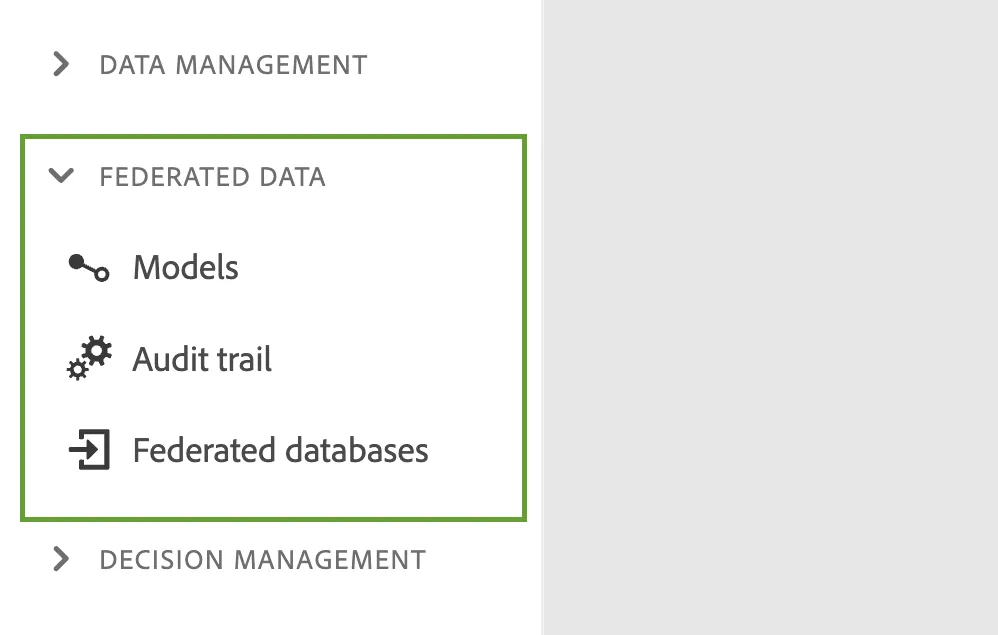
- Models
- Allows you to explore Schemas and Data models (relationships)
- Audit trail
- Allows you to see the change history in federated database connection management
- Federated databases
- Allows you to browse through different databases available to connect/use
Audience Composition
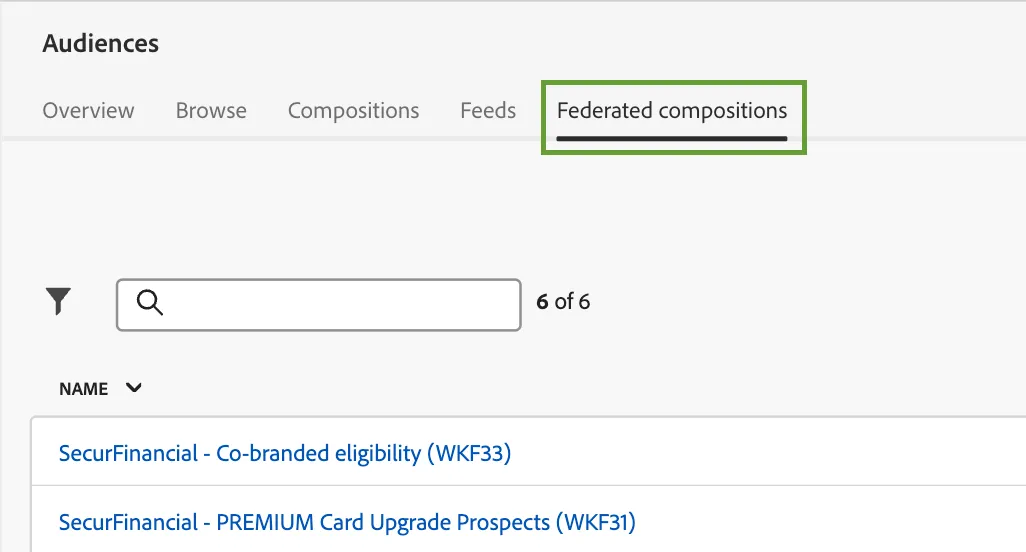
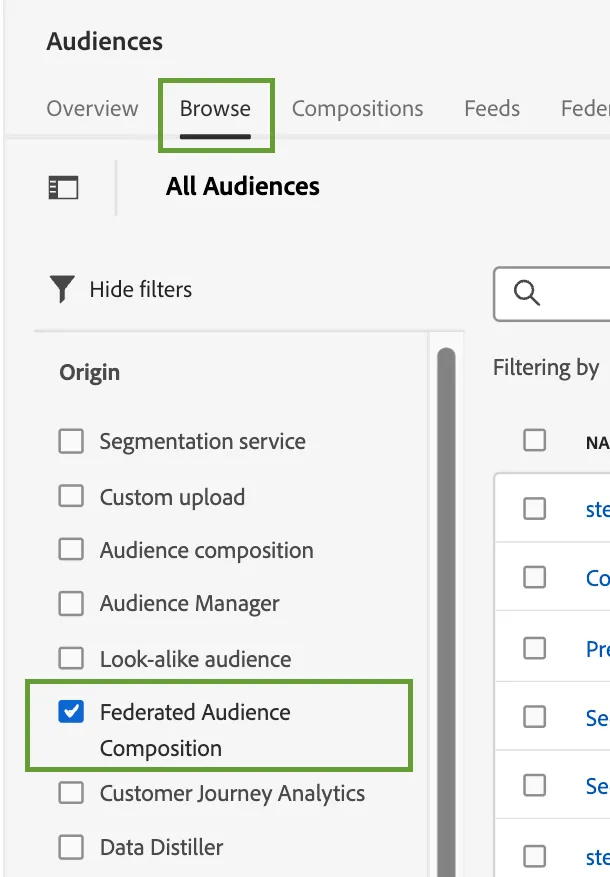
Browse resultant audiences
Retail scenario
Database connection
Name: Luma Datasource
Type: Snowflake
Database: CUSDEVDB1
Entities & Relationships
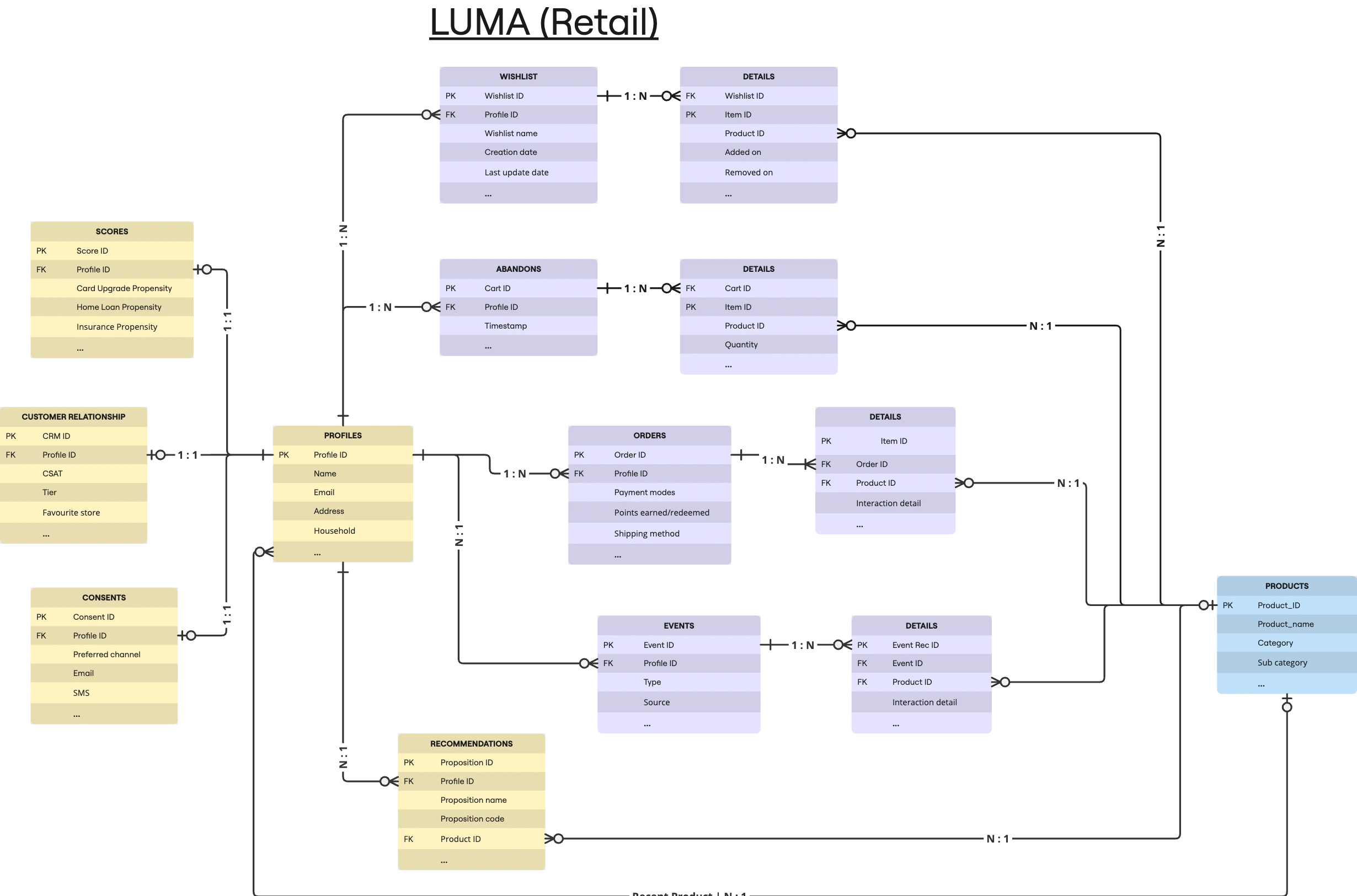
Compositions
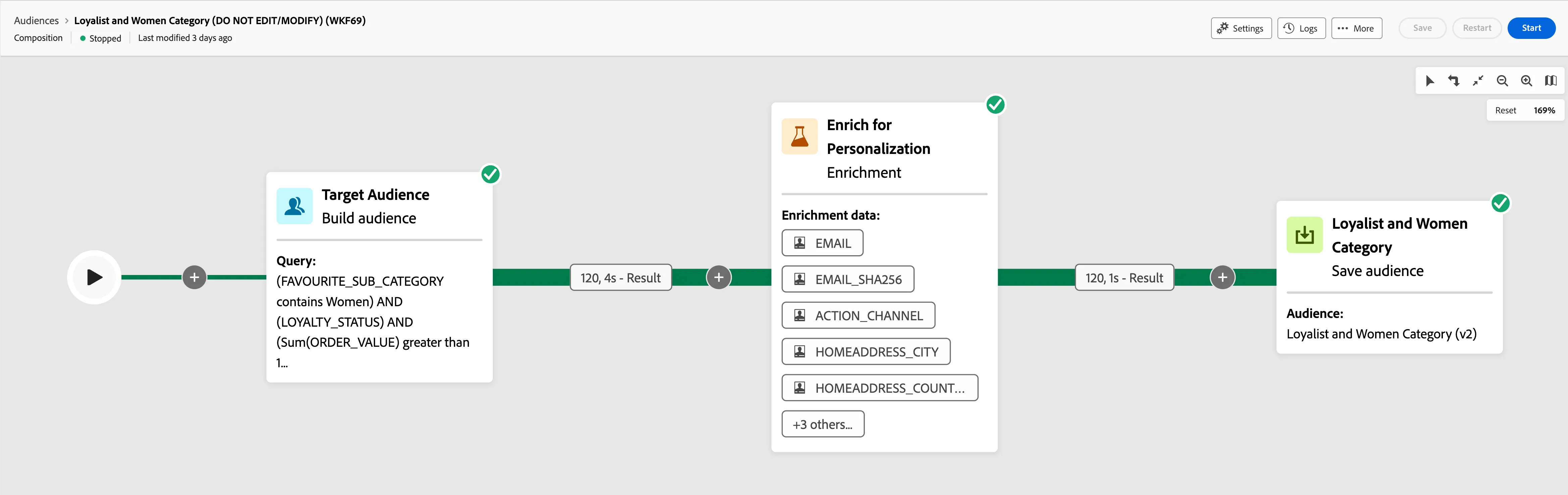
Customers whose category affinity is equal to women, and they are signed up for the loyalty program.
Create audience:
- "Favourite Sub-Category" (CRM) contains "Women"
- "Loyalty status" (CRM) is True
- Having "Order value" > $1,500
Highlight: Enrichment
Scheduled: No
Result audience name: Loyalist and Women Category (v2)
Identity: Email
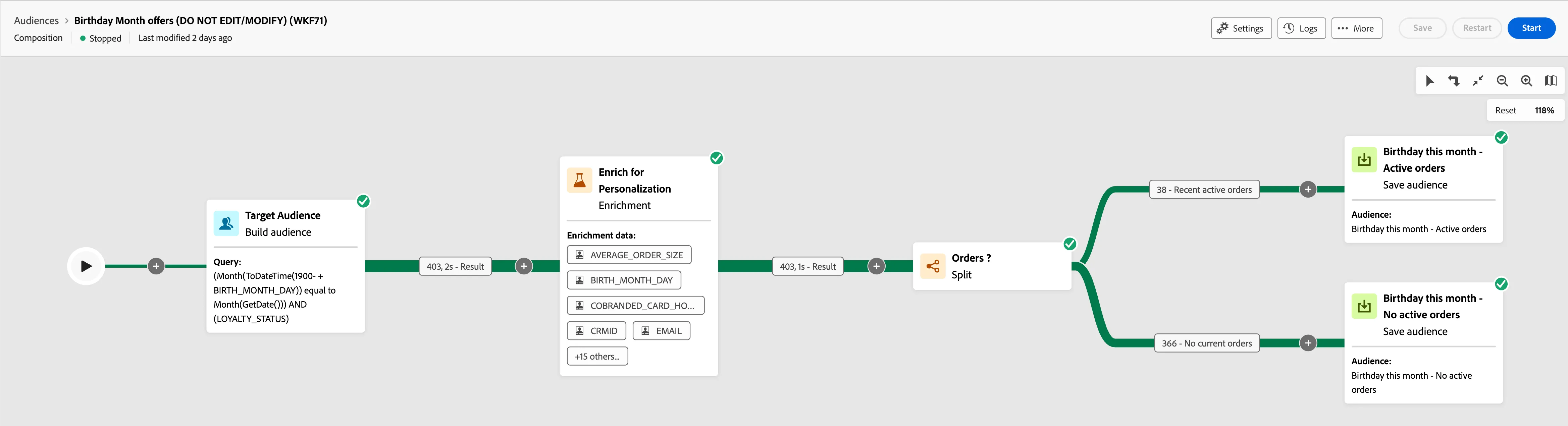
Create audience of customers who have a birthday this month, if they have an active order, target them for a birthday offer that references their order status. However, if they do not have an active order, just target them with a birthday offer.
Create audience:
- Birthdate falls in current month
- "Loyalty status" (CRM) is True
Highlight: Conditional split, Enrichment
Scheduled: No
Result audience name: Birthday this month - Active orders, Birthday this month - No active orders
Identity: Email
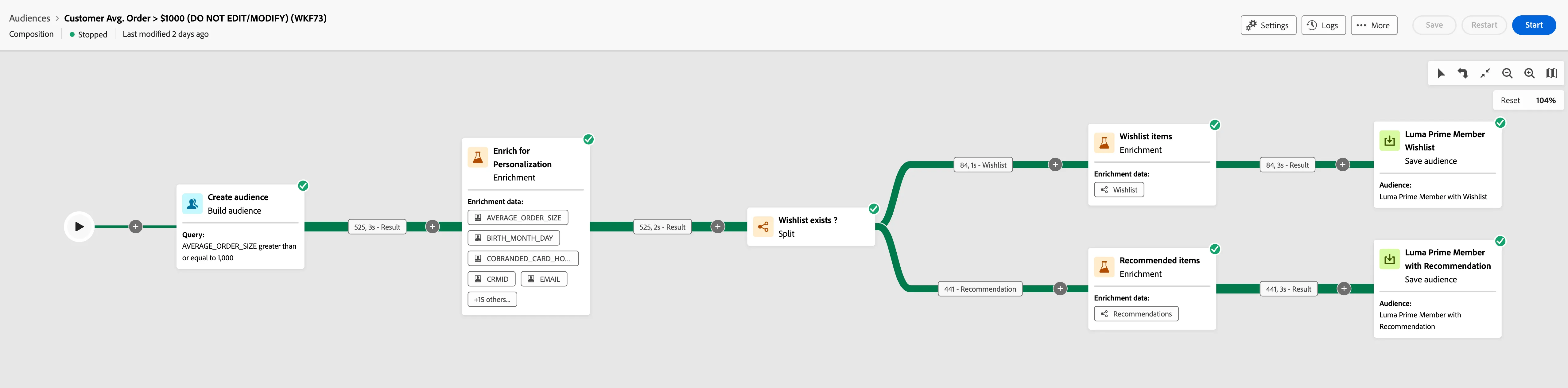
Prior Order History is greater or equal to $1000 and has consented to marketing communications. Additionally, with enrichment, we can also couple together this output with, “does a Wishlist exist?” for this specific user – this could warrant retargeting or offers being sent to that user when an item / product on their wish list changes price or stock levels.
Create audience:
- Total order value greater than $1000
- Based on linked "Wishlist" items split into two categories of audience.
Highlight: Conditional split, Enrichment
Scheduled: No
Result audience name: Luma Prime Member with Wishlist, Luma Prime Member with Recommendation
Identity: Email
FSI Scenario
Database connection
Name: SecurFinancial Datasource
Type: Snowflake
Database: CUSDEVDB2
Entities & Relationships
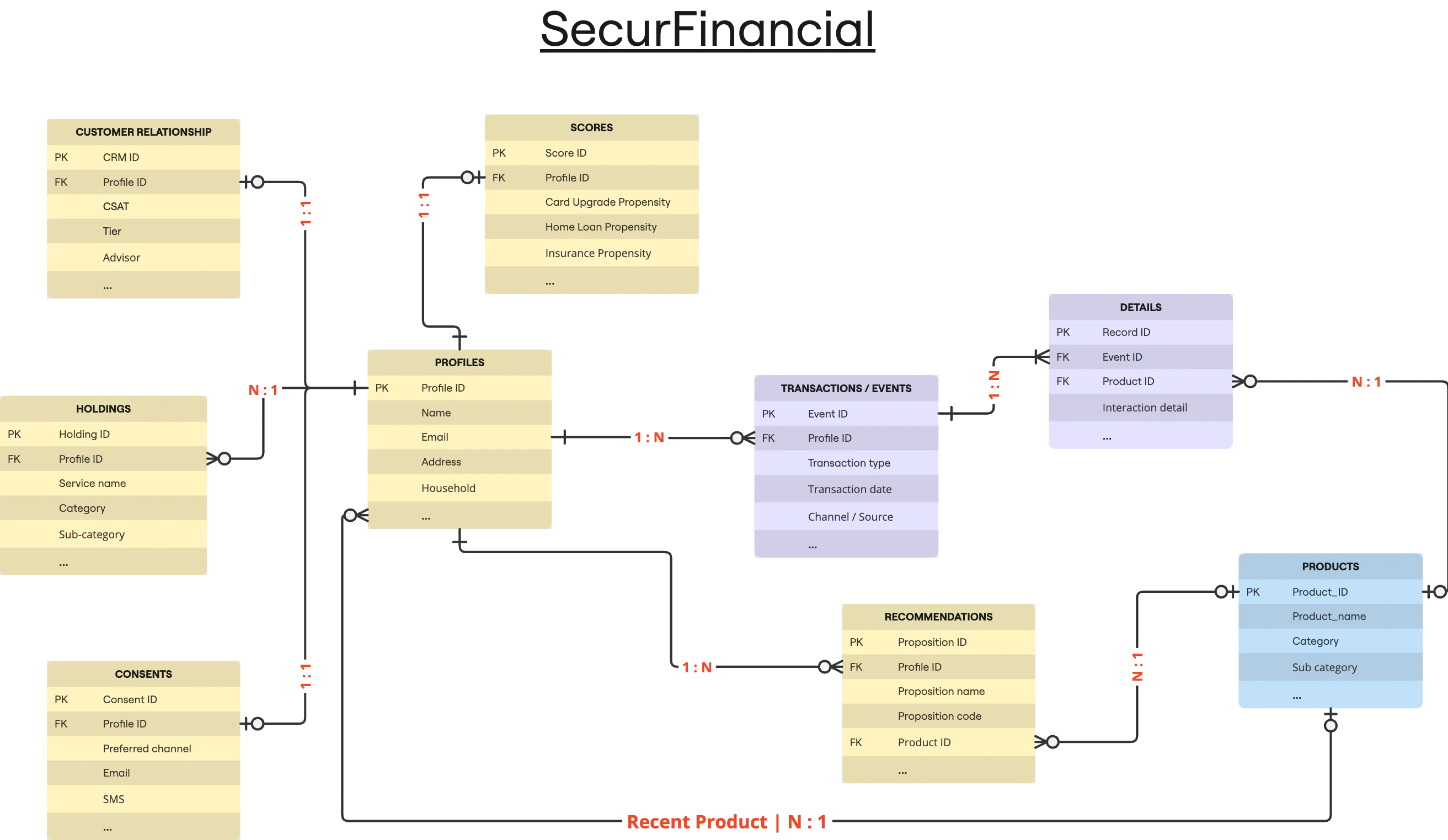
Compositions
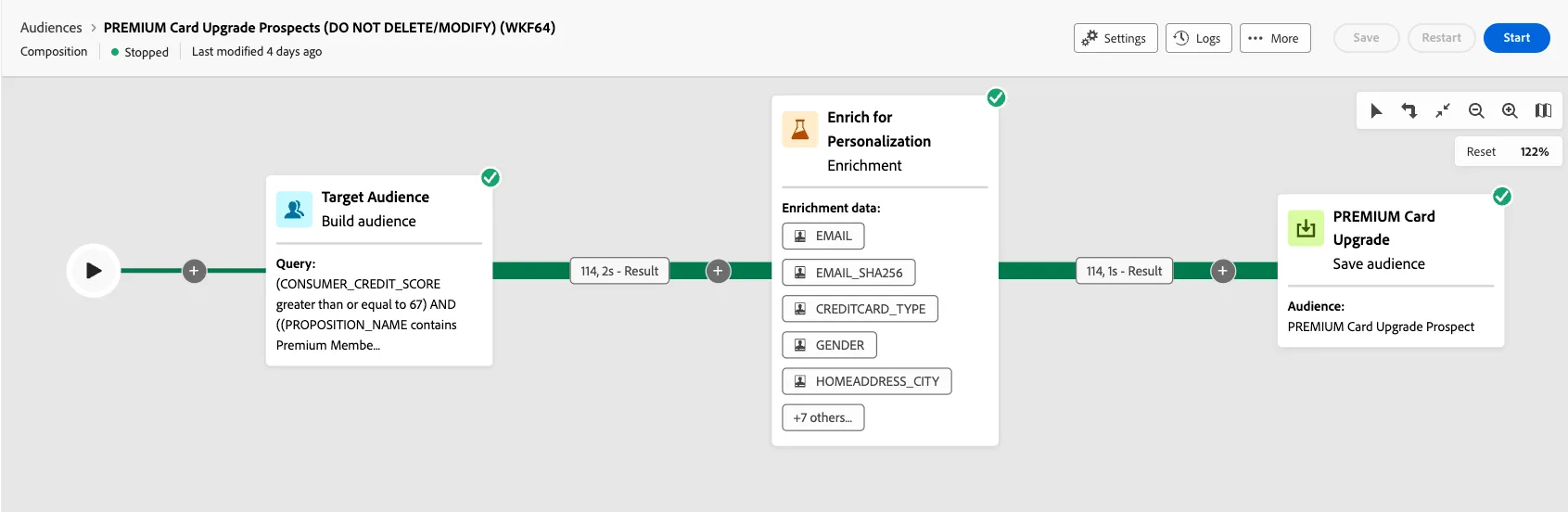
Customers segment for premium card feature promotion.
Create audience:
- "Consumer Credit score" (CRM) greater than 67
- "Recommendation" name contains "Premium Membership"
- "Recommendation" is valid i.e. "Valid up to" date is greater than today.
Scheduled: Yes, Once on weekdays
Result audience name: PREMIUM Card Upgrade Prospect
Identity: Email
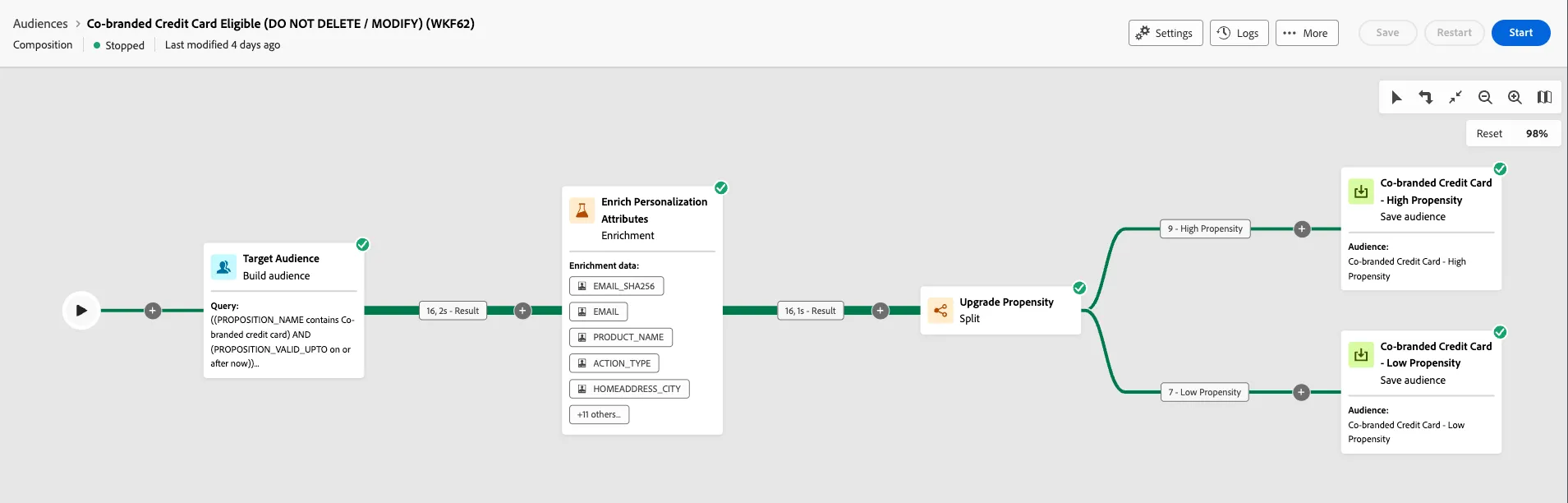
Pre- approved for a co-branded credit card using the event types of either transaction, payment, or information
Create audience:
- "Recommendation" contains "Co-branded credit card"
- "Recommendation" is valid i.e. "Valid up to" date is greater than today.
- Recent transactions of type "Request Card Replacement", "Apply Credit Card" etc. has product category "Credit Cards"
Scheduled: Yes, Once on weekdays
Result audience name: Co-branded Credit Card - High Propensity, Co-branded Credit Card - Low Propensity
Identity: Email
Telco scenario
Database connection
Name: CitiSignal Datasource
Type: Snowflake
Database: CUSDEVDB5
Entities & Relationships
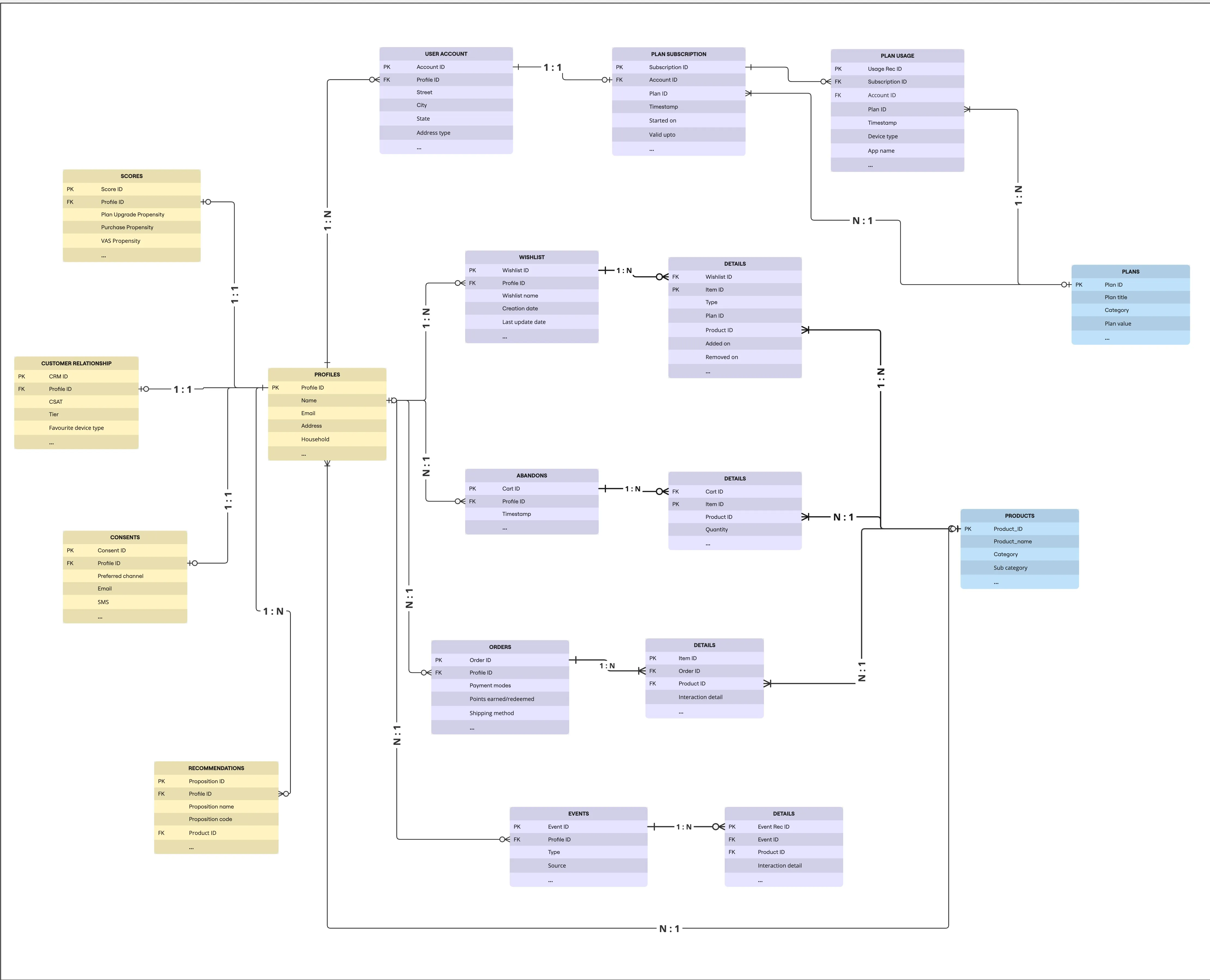
Compositions
Segment customers based on purchase / transactions on their subscription plans.
Create audience:
- Target profiles with marketing consent.
- Enrich filtered audience with personalize attributes, such as, eligibility for fibre connection, propensity for device upgrade, number of devices owned, (aggregate) quarterly average order value etc.
- Split the audience:
- High Pre-paid Transactions: ([Engagements/Items/Product/@PRODUCT_CATEGORY] equal to Subscription Plans) AND ([Engagements/Items/Product/@PRODUCT_SUB_CATEGORY] included in (Prepaid Plans, Data Add-ons, Entertainment Add-ons)) AND ([Engagements/@EVENT_DATE] greater than or equal to 6 months ago) AND (Sum([Engagements/@TRANSACTION_AMOUNT]) greater than 500)
- High Roaming Transactions: ([Engagements/Items/Product/@PRODUCT_CATEGORY] equal to Subscription Plans) AND ([Engagements/Items/Product/@PRODUCT_SUB_CATEGORY] equal to Mobile Roaming Plans) AND ([Engagements/@EVENT_DATE] greater than or equal to 6 months ago) AND (Count([Engagements/@EVENT_ID]) greater than or equal to 3)
- High Broadband Transactions: ([Engagements/Items/Product/@PRODUCT_CATEGORY] equal to Subscription Plans) AND ([Engagements/Items/Product/@PRODUCT_SUB_CATEGORY] like %Broadband%Plans%) AND ([Engagements/@EVENT_DATE] greater than or equal to 6 months ago) AND (Sum([Engagements/@TRANSACTION_AMOUNT]) greater than 1500)
- Complement: For rest of the target audience, check if they are eligible for fibre connection and have fibre connection related plans in last 6 months. Split condition: ([FIBRE_CONNECTION_ELIGIBLE] equal to 1) AND ([Wishlist/Items/Product/@PRODUCT_CATEGORY] equal to Subscription Plans) AND ([Wishlist/Items/Product/@PRODUCT_SUB_CATEGORY] contains Fibre) AND ([Wishlist/@CREATED_DATE] greater than or equal to 6 months ago)
- Result audiences: CitiSignal - Mobile Plan Upgrade Prospect (Transactions), CitiSignal - Roaming Plan Upgrade Prospect (Transactions), CitiSignal - Fibre Connection Prospect (Transactions)
- Identity: Email

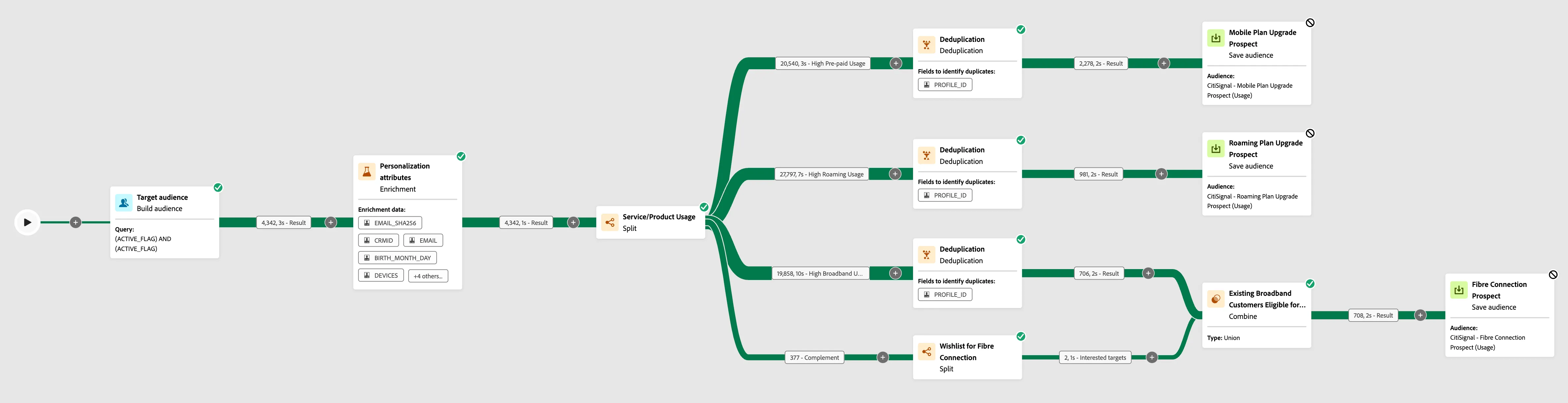
Segment customers based on subscribed plan usage.
Create audience:
- Target profiles with active Account and active Subscription.
- Enrich filtered audience with personalize attributes, such as, eligibility for fibre connection, propensity for device upgrade, number of devices owned, (aggregate) total number of devices associated to active accounts etc.
- Split the audience:
- High Pre-paid Usage: ([Accounts/Subscription/Plan/@PLAN_TYPE] included in (Talk-Time & Data, VAS)) AND ([Accounts/Subscription/Plan/@PLAN_SUB_TYPE] included in (Mobile Bundle Plans, Mobile Talk-Time Plans, Prepaid Plans, Data Add-ons)) AND (([Accounts/Subscription/Usage/@USAGE_DATE] on or after last month) AND ((Sum([Accounts/Subscription/Usage/@DATA_USAGE_MB]) greater than or equal to 10,000) AND (Sum([Accounts/Subscription/Usage/@VOICE_USAGE_DURATION_SECS]) greater than or equal to 45,000)))
- High Roaming Usage: ([Accounts/Subscription/Plan/@PLAN_TYPE] included in (Talk-Time & Data, VAS)) AND ([Accounts/Subscription/Plan/@PLAN_SUB_TYPE] included in (Mobile Roaming Plans, Data Add-ons, Entertainment Add-ons)) AND (([Accounts/Subscription/Usage/@USAGE_DATE] on or after 3 months ago) AND ((Sum([Accounts/Subscription/Usage/@DATA_USAGE_MB]) greater than or equal to 15,000) AND (Sum([Accounts/Subscription/Usage/@VOICE_USAGE_DURATION_SECS]) greater than or equal to 30,000)))
- High Broadband Usage: ([Accounts/Subscription/Plan/@PLAN_TYPE] included in (Network, Satellite services, VAS)) AND ([Accounts/Subscription/Plan/@PLAN_SUB_TYPE] included in (Broadband & Media Plans, Broadband Plans, Private LTE Network, Satellite Broadband Plans, Entertainment Add-ons, Media & Entertainment Plans)) AND ([Accounts/Subscription/Usage/@USAGE_DATE] on or after 3 months ago) AND (Sum([Accounts/Subscription/Usage/@DATA_USAGE_MB]) greater than or equal to 10,000)
- Complement: For rest of the target audience, check if they are eligible for fibre connection and have fibre connection related plans in last 6 months. Split condition: ([FIBRE_CONNECTION_ELIGIBLE] equal to 1) AND ([Wishlist/Items/Product/@PRODUCT_CATEGORY] equal to Subscription Plans) AND ([Wishlist/Items/Product/@PRODUCT_SUB_CATEGORY] contains Fibre) AND ([Wishlist/@CREATED_DATE] greater than or equal to 6 months ago)
- Result audiences: CitiSignal - Mobile Plan Upgrade Prospect (Usage), CitiSignal - Roaming Plan Upgrade Prospect (Usage), CitiSignal - Fibre Connection Prospect (Usage)
- Identity: Email
Segment customers based on renewal of subscription plans & re-engage with customers using available recommendations.
Create audience:
- Separate branches to select target profiles based on active subscription account and inactive subscription account.
- Enrich filtered audience with personalize attributes, such as, eligibility for fibre connection, propensity for device upgrade, number of devices, (collection) recommendations etc. Must also include number of days due DaysDiff(VALID_UPTO (target/Subscription/@VALID_UPTO), GetDate())
- Convert the result to Profile record schema and perform deduplication based on PROFILE_ID / EMAIL / EMAIL_SHA256
- Split the audience:
- Split the active account users by renewal due date: (Assuming the NUM_OF_DAYS_DUE already added in enrichment activity) (NUM_OF_DAYS_DUE greater than 0) AND (NUM_OF_DAYS_DUE less than 15)
- Complement: For rest of the target audience saved to experience platform
- In the inactive account branch, include recommendation using enrichment activity.
- Result audiences: CitiSignal - Upcoming bill due, CitiSignal - Bill Past Due, CitiSignal - Customer reengagement
- Identity: Email

Healthcare scenario
Database connection
Name: Healthcare Datasource
Type: Snowflake
Database: CUSDEVDB6
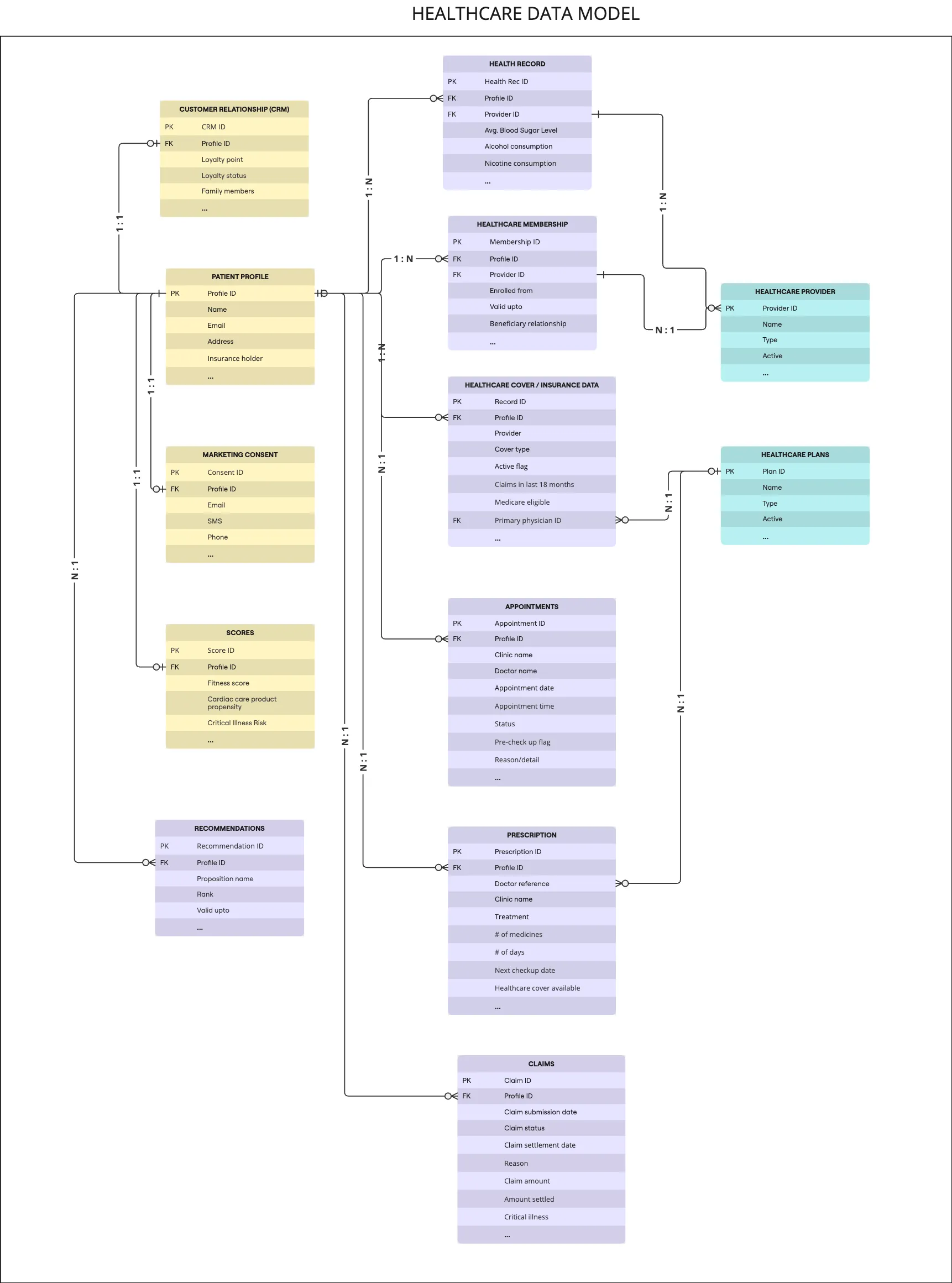
Entities & Relationships
Compositions
Segment customers based on prescription due in few days or past due and provided consent to share data for personalisation.
Create audience:
- Target profiles, who have made a purchase in last 3 months and marketing consent to "Share" data for personalization.
- Enrich filtered audience with personalize attributes, such as, claims in last few months, offers redeemed, translate refill reminder (simple expression), number of checkups (aggregated value).
- Deduplicate target audience by prescription refill due days (i.e. refill due recent)
- Split the audience:
- Refill due: REFILL_DUE_IN_DAYS greater than 0
- Refill past due: REFILL_DUE_IN_DAYS less than 0
- Result audiences: Healthcare - Prescription due for refill, Healthcare - Prescription past due
- Identity: Email

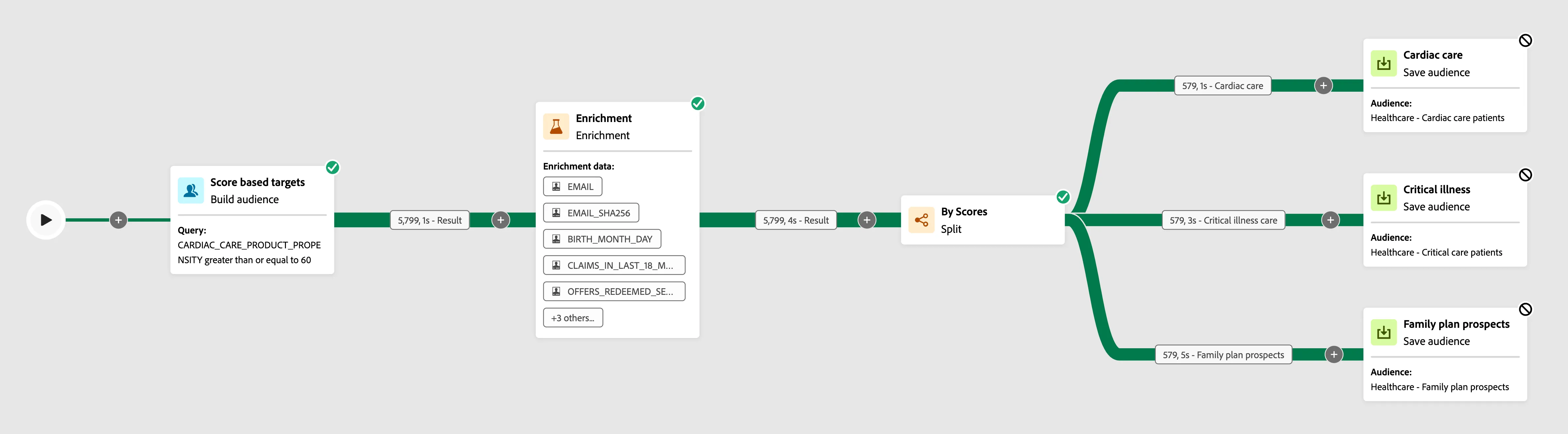
Segment customers based on healthcare industry related scores and provided consent to share data for personalisation.
Create audience:
- Target profiles with scores related cardiac care, critical illness risk, propensity for healthcare family plans and marketing consent to "Share" data for personalization.
- Enrich filtered audience with personalize attributes, such as, claims in last few months, offers redeemed, number of prescriptions in last 3 months (aggregated value).
- Split the audience:
- Cardiac care: CARDIAC_CARE_PRODUCT_PROPENSITY greater than or equal to 80
- Critical illness care: CRITICAL_ILLNESS_RISK greater than or equal to 40
- Family plan prospects: HEALTHCARE_FAMILY_PLAN_PROPENSITY greater than or equal to 50
- Result audiences: Healthcare - Cardiac care patients, Healthcare - Critical care patients, Healthcare - Family plan prospects
- Identity: Email
Segment customers based on critical illnesses and clinical services opted by targets, along with consent to share data for personalization
Create audience:
- Target profiles with health records in last 3 months, sponsered healthcare plan, identified with illness (categoriesed as critical diseases) and marketing consent to "Share" data for personalization. ( REPORT_DATE on or after 3 months ago ) AND ( CRITICAL equal to Yes ) AND ( HEALTHCARE_SPONSERED is true ) AND ( SHARE is true )
- Change the resultant target dimension to match with Profile schema.
- Split the audience:
- Cardiac care: CARDIAC_CARE_TYPE included in Cardiology, Pulmonology
- Oncology care: CARDIAC_CARE_TYPE included in Oncology, Emergency Medicine, Endocrinology
- Other critical diseases (Type: Complement)
- Perform data reconciliation, enrichment and deduplication activities to filter target and personalization attributes
- Result audiences: Healthcare - Cardiac patients prescription, Healthcare - Oncology patient care, Healthcare - Recommendation for clinical trial patients
- Identity: Email

HighTech (B2B) scenario
Database connection
Name: HighTech (B2B) Datasource
Type: Snowflake
Database: CUSDEVDB7
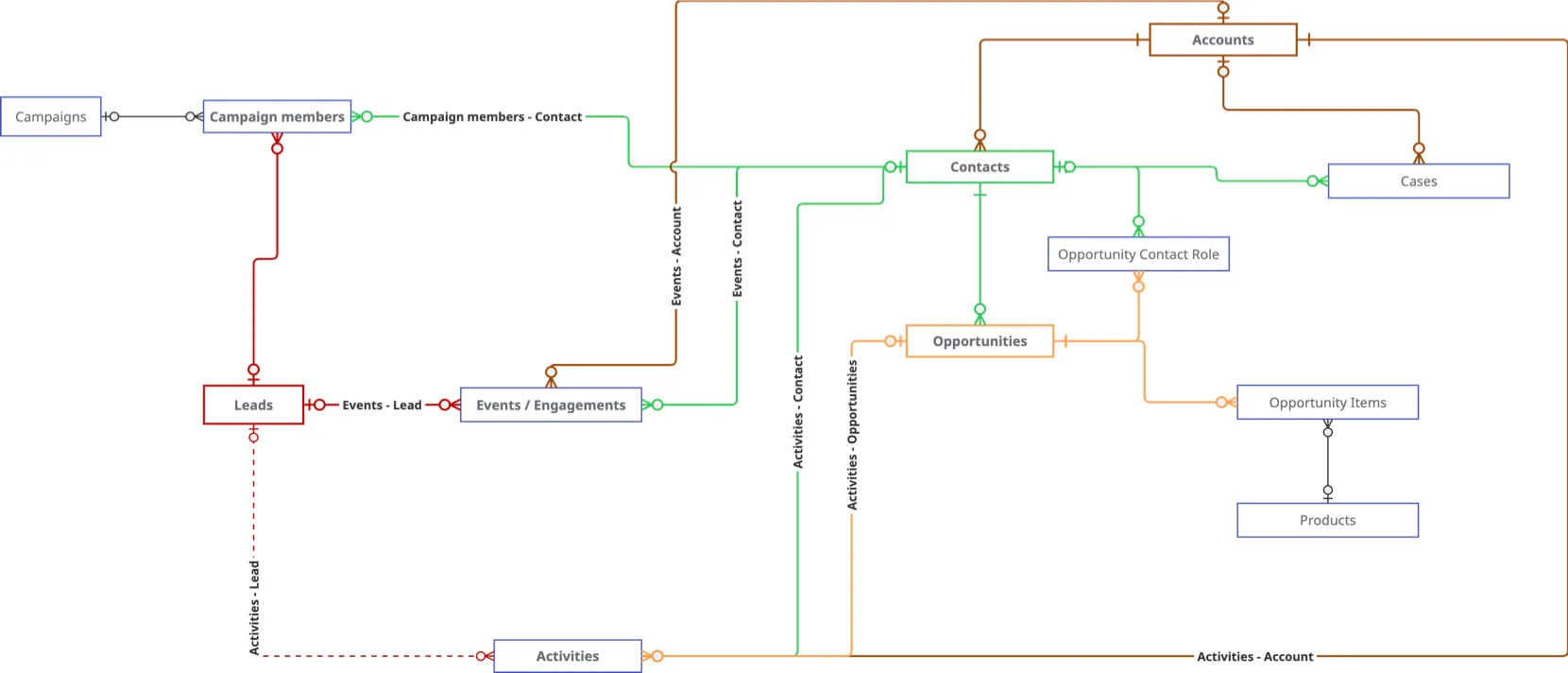
Entities & Relationships
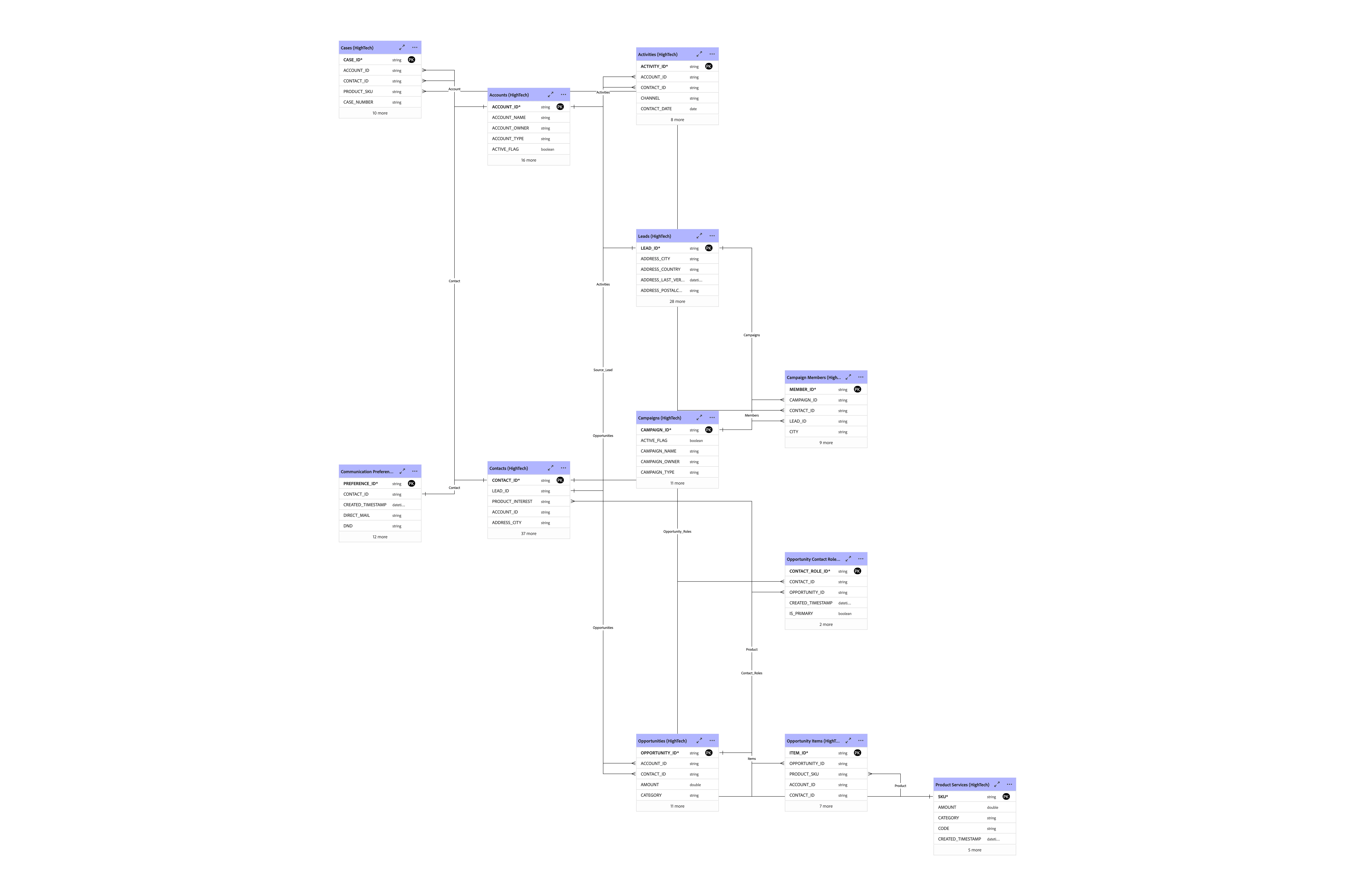
Compositions
Identify newly acquired leads or contacts who have not been effectively engaged, and retarget them with personalized campaigns to promote relevant service offerings.
Create audience:
- Separate branches to select prospects:
- Leads: Acquired in last 3 months with status "Open/Not contacted" and rated "Hot or Warm of NULL"
- Contacts: Converted in last 3 months with status "Open or Working"
- Enrich filtered prospect with personalize attributes, such as, associated value, company, product/service category etc.
- Since, we plan to target all Leads and Contacts; so, we choose to convert Contact record to Lead type and merge data to proceed further. (NOTE: All Contacts have associated Lead value; but, the vice-versa is not true)
- Split the audience:
- Split the prospects by "Associated Value" (or potential revenue)
- Process further by segmenting the prospects:
- Entry-Level Software Prospect: Leads likely to purchase basic or initial-level software products.
- Enterprise Software Buyers: Large-scale enterprises looking to invest significantly in software.
- Managed Services Prospects: Prospects considering ongoing or specialized service engagements.
- Result audiences: HighTech - Entry-Level Software Prospects, HighTech - Enterprise Software Buyers, HighTech - Managed Services Prospects
- Identity: Email
 HighTech - Prospect Engagement
Destination
While activating audience and enriched attributes, you could leverage existing "Federated Audience Composition" (Type: Adobe Applications) destination for Demo System Next, which is a Snowflake database; or, you may choose to create a new destination.
Learn how to create tables and populate data in Snowflake to demonstrate Federated Audience Composition.
While creating federated database connection in Experience Platform, it is a good practice to refer "Working schema" property (Working schema is the schema in the federated database, with required privilege for the connection user to create/manage tables).
By specifying a "Working schema" property for the federated database connection in Experience Platform, you're ensuring a cleaner and more organized database structure. This allows:
- Separation of Concerns: Activation data tables will be created in a dedicated schema, keeping them separate from the original read schema.
- Cleaner Table Names: The read schema will not get cluttered with the alphanumeric table names generated by the activation service, which helps maintain clarity and ease of navigation.
- Controlled Privileges: The working schema will have the required privileges for the connection user to create and manage tables, ensuring proper security and access control.
This approach enhances the maintainability and readability of your database, which can be especially important in re-usable environments.
Do not refer the same audience label \ name in "Save segment" activity, in multiple composition workflows.
Reusing the same audience label or name in the "Save segment" activity across multiple composition workflows can lead to conflict / error and data integrity issues. To maintain clarity and avoid any potential conflicts, it's crucial to use unique labels or names for each segment within different workflows. This ensures that each segment is distinctly identifiable and correctly associated with its respective workflow.
Once a "Save segment" activity is executed and the corresponding audience is created, it's essential not to add new attributes (audience mapping properties) or change the data types of existing attributes. This is particularly important because:
- Consistency: Changing data types or adding new attributes can lead to inconsistencies in the data, making it challenging to maintain and interpret.
- Data Integrity: Ensuring the data remains unchanged preserves the integrity of the audience segment, preventing potential errors or mismatches in subsequent workflows.
- Stability: Keeping the structure of the audience data stable avoids disruptions in any downstream processes or integrations that rely on the original schema.
Compatibility: Expressions and data transformations often depend on the original data types. Altering these can result in invalid expressions or incompatible data formats.
(Data type change usually occur in case of expressions.)
When activating an audience using the federated destination category, tables with alphanumeric names are created. To easily identify the target table for a specific segment in the federated destination, it is recommended to include the segment name or a unique label during the data activation process.
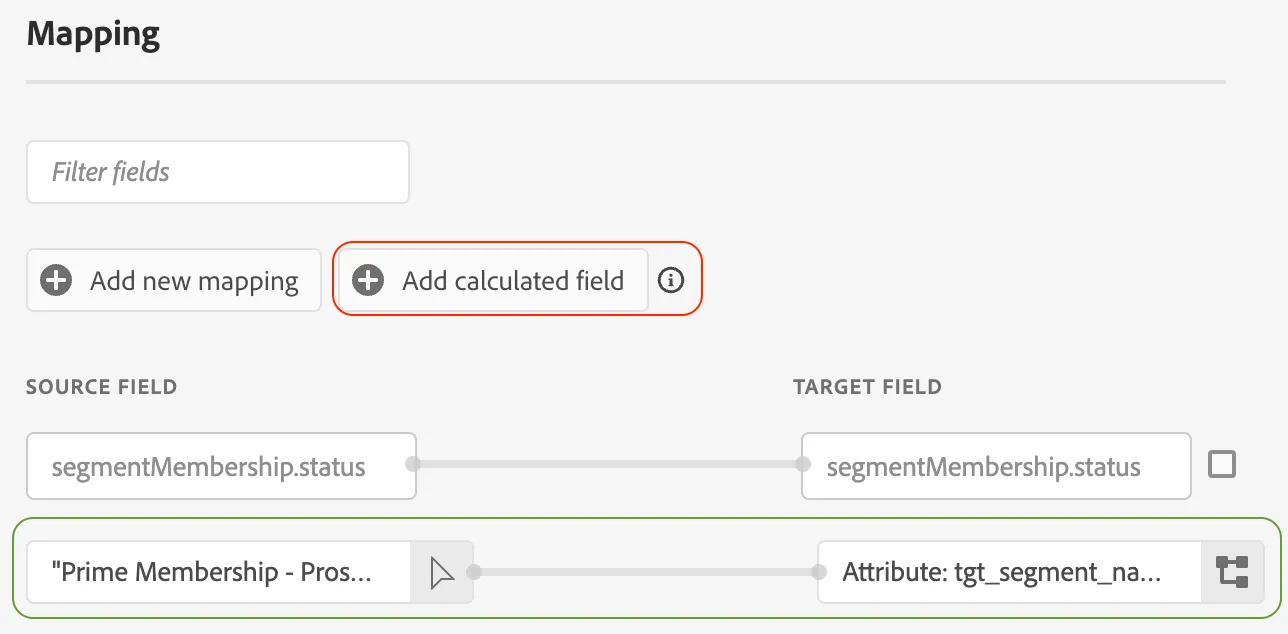
Incorporate segment name / unique label (e.g. static string expression like "Prime membership prospect") in "Save audience" activity (Audience mapping) within composition workflow.
Ensure the segment name or unique label is included as an attribute during the "Save audience" activity. This facilitates clear identification and association of the segment.
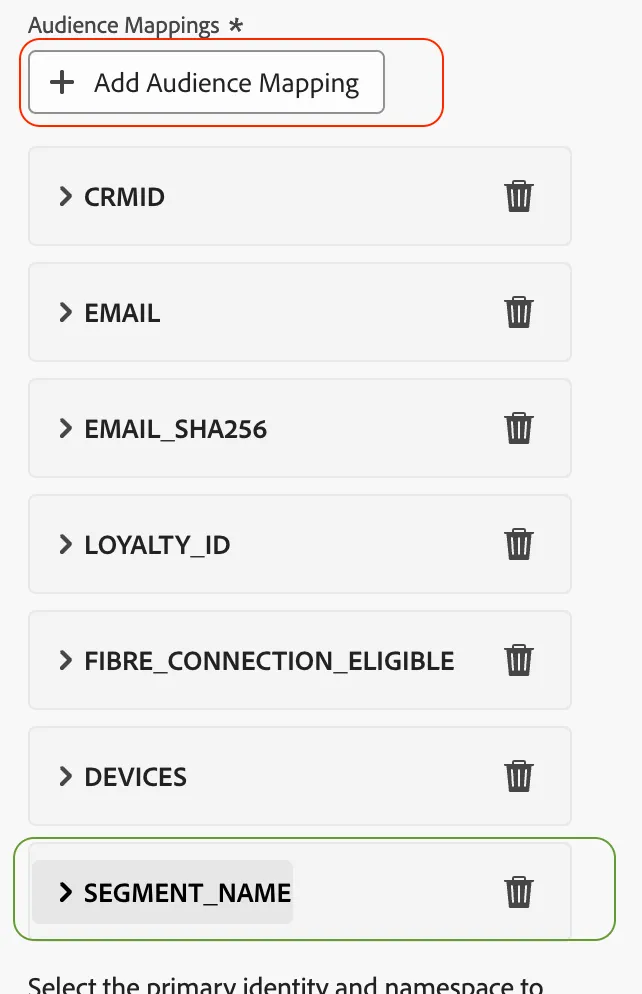
If the segment name or unique label is captured as an audience attribute from the composition workflow, it can be added as a "Calculated (mapping) field" during the activation step. This attribute should be included to maintain clarity and ease of identification in the federated destination.